Why check the files of a PrestaShop store
Once attackers get a foothold on a store, they often edit an existing PHP file instead of creating a new one, so their code hides inside a legitimate file. That is enough to plant a backdoor, steal customer data, redirect payments or send spam from your server. Comparing your files with the originals on a regular basis lets you spot these changes before they cause damage.
What Sentinel does
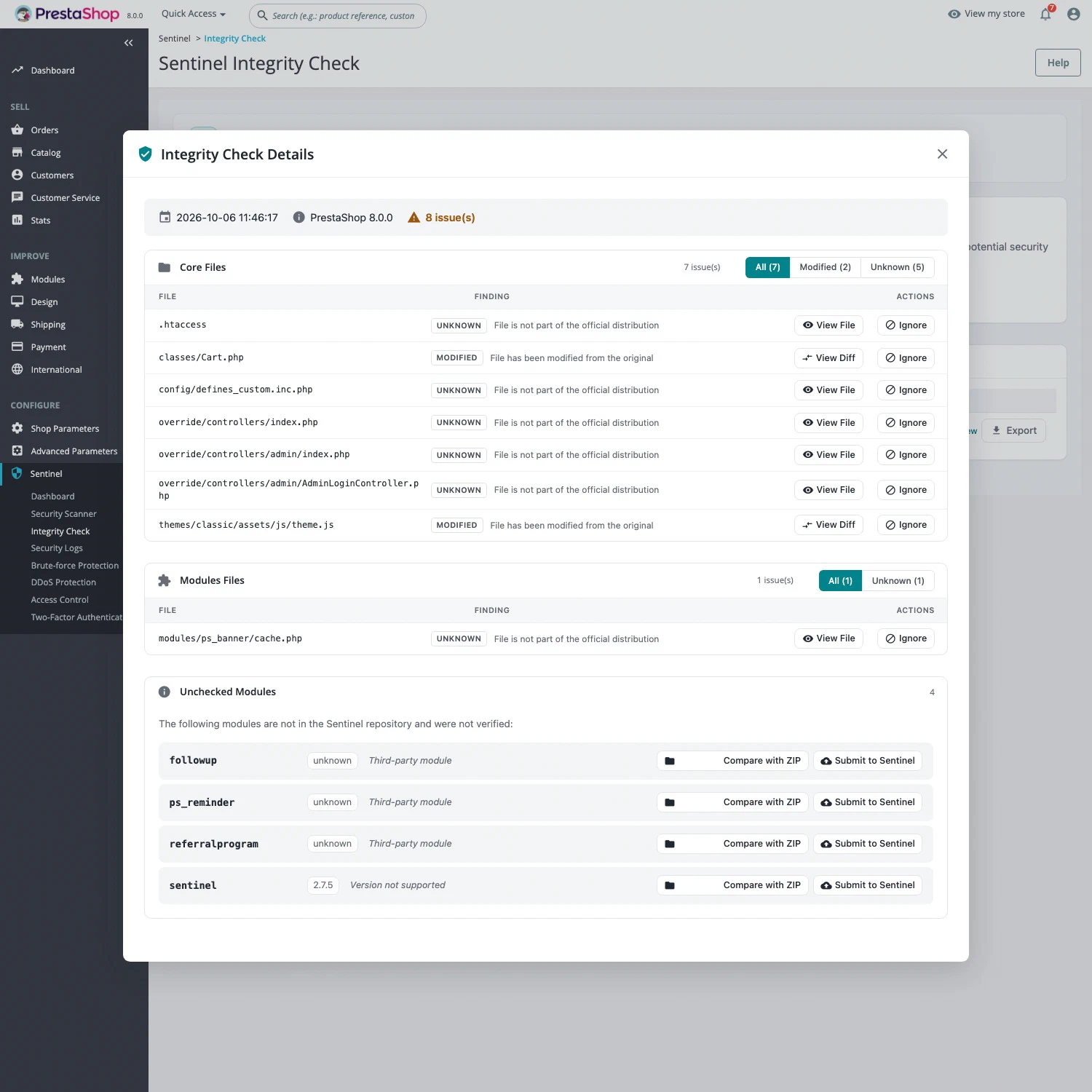
Sentinel computes a fingerprint of every file in your installation and checks it, through the Sentinel service, against the official files for your PrestaShop version. Results are grouped into three sections (core, modules and themes), and each difference gets a status:
- Modified: the content differs from the original;
- Unknown: the file does not exist in the official version;
- Missing: an official file is gone.
Before comparing, Sentinel ignores differences in whitespace, line endings and indentation, which would otherwise trigger false alarms. Any added code is still detected. The View Diff button shows added lines in green and removed lines in red.
When Sentinel has no reference for a module, you can compare the installed module with its official ZIP archive. A custom theme can be submitted to Sentinel so that later checks verify it. Exclusion rules, editable from the module settings, keep folders that are not part of PrestaShop, such as development tooling, out of the report.
A Sentinel Pro feature
The integrity check is part of Sentinel Pro, at €29.90 excl. tax per month per installation, with no commitment. It includes six manual checks per 24 hours, a daily automatic check outside that quota with the report sent by email, a check history, and CSV, JSON and TXT exports. The Free edition does not include it: see Free or Pro for the full breakdown.
Running your first check
- Install Sentinel and activate Pro from the module.
- Go to Sentinel > Integrity Check and click Check Integrity.
- Review each flagged file with the diff. If a legitimate folder shows up as Unknown, add it to the exclusions.
- Schedule the daily check in Sentinel > Configuration, on the Scheduling and alerts tab, and pick who receives the report.
The sentinel:integrity command runs the same check from the server, which helps with automation or when the back office is unreachable.
What the integrity check does not do
Sentinel reports differences: it does not restore files or remove malicious code. A module that is not in the Sentinel repository stays “unchecked” until you compare it with its ZIP, and a theme that was already altered when you submit it would be accepted as it is. On a large installation, a check can take several minutes. Backups and updates remain essential. The vulnerability scanner and the web application firewall complement this check: the first flags known vulnerabilities, the second blocks attacks.