The risk: more requests than one store can take
A request flood, aggressive scraping or overly persistent bots can overwhelm a PrestaShop store. Every request boots PrestaShop and queries the database. When they pile up, the store slows down or stops responding, and real customers can no longer place orders.
What Sentinel does
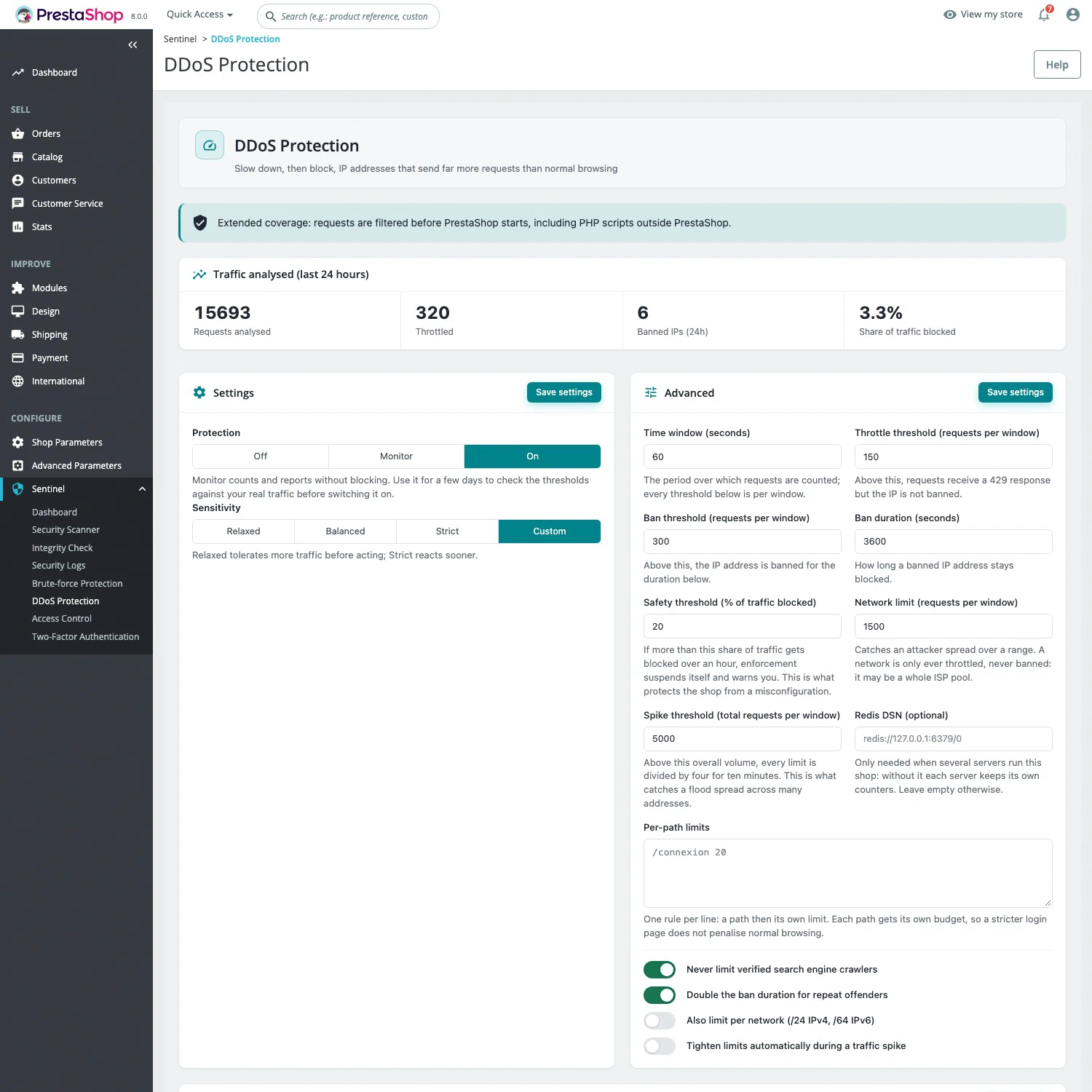
Sentinel counts the requests from each IP address over a sliding window:
- Throttling: above a first threshold, the address gets an HTTP 429 response telling it when to retry. It is not banned.
- Banning: above a second threshold, the address is banned for a limited time.
- Repeat offenders: each repeat offense makes the ban longer, up to 24 hours at most. Bans expire on their own.
Everyday setup comes down to two choices: the mode (Off, Monitor or On) and the sensitivity (Relaxed, Balanced by default, Strict or Custom). Advanced options add a per-network limit that throttles but never bans, separate limits for specific paths such as the login page, and automatic tightening during a traffic spike.
Never rate-limited: trusted IPs, employees signed in to the back office, verified search crawlers and excluded URLs. If too large a share of traffic is blocked over an hour, Sentinel pauses blocking by itself and shows a warning, so a misdeclared proxy cannot take the whole store offline.
With extended coverage (Auto Prepend), the decision is made before PrestaShop starts: around 0.2 ms, against roughly 130 ms to boot PrestaShop.
Free or Pro?
Application-level anti-DDoS is part of Sentinel Pro, at €29.90 excl. VAT per month per installation, with no commitment. The Free edition does not rate-limit requests. The trusted IP list can be edited in both editions.
Getting started
- Install Sentinel and activate Pro.
- Under Sentinel > Configuration, in the General tab, declare your proxy or CDN and your trusted IPs.
- In the DDoS tab, choose Monitor mode and Balanced sensitivity.
- After a few days, check Sentinel > DDoS Protection: requests analysed, throttled, banned IPs and share of traffic blocked.
- Set protection to On, and install extended coverage if your hosting allows it.
A visitor blocked by mistake can be released from the ban list, or with sentinel:rate-limit reset followed by their address.
Limits
- Application-level protection. A volumetric network attack saturates the server before PHP even runs, and no module can respond to that. It is a job for your host or network provider.
- Per-address counting. Visitors behind the same company network or mobile carrier may share one address, which is why the default thresholds are generous.
- Local counters. If several servers run the same store, each one keeps its own counters.
- Without extended coverage, every blocked request still costs a full PrestaShop boot.
For repeated password attempts on the back office, see brute-force protection; for malicious requests, the web application firewall.